QuickBooks Essentials Features and Its Ideal Users
- Andria Radmacher

- Aug 25
- 5 min read
QuickBooks Essentials is an accounting software designed to make financial management easier for small and medium-sized businesses. With features tailored for various industries, this software helps businesses manage their finances efficiently and effectively. In this post, we will explore the key features of QuickBooks Essentials and identify the types of users who can benefit the most from it.
Key Features of QuickBooks Essentials
1. Invoicing and Payment Processing
A standout feature of QuickBooks Essentials is its invoicing capabilities. Users can create and send professional invoices in a matter of seconds. The software allows for customization, where businesses can add their logo and personalize the layout to match their brand image.
Moreover, QuickBooks Essentials supports online payment processing. This means customers can pay their invoices directly through them, which speeds up the payment collection process. In fact, businesses that use online payments see, on average, a 25% improvement in payment speed. This feature enhances cash flow management and helps businesses maintain healthier financial standing.
2. Expense Tracking
Tracking expenses is made simple with QuickBooks Essentials. Users can connect their bank accounts and credit cards directly to the software, allowing automatic importing of transactions. For example, if a business spends $1,200 on supplies, QuickBooks will categorize this expense for easy access later.
Additionally, users can attach receipts to expenses, ensuring everything is organized. This capability is particularly valuable for businesses that need to monitor their spending closely. Companies using expense tracking tools can reduce their unnecessary expenses by up to 20%, making it worthwhile for any business.
3. Time Tracking
For businesses that offer services, accurate time tracking is essential. QuickBooks Essentials includes features that allow employees to log their hours directly within the software. This not only simplifies payroll processing but also helps businesses bill clients accurately.
For example, if a consulting firm tracks 150 hours of billable work and charges $100 per hour, this feature can significantly impact revenue, generating $15,000 for the business without additional administrative burdens.
4. Reporting and Analytics
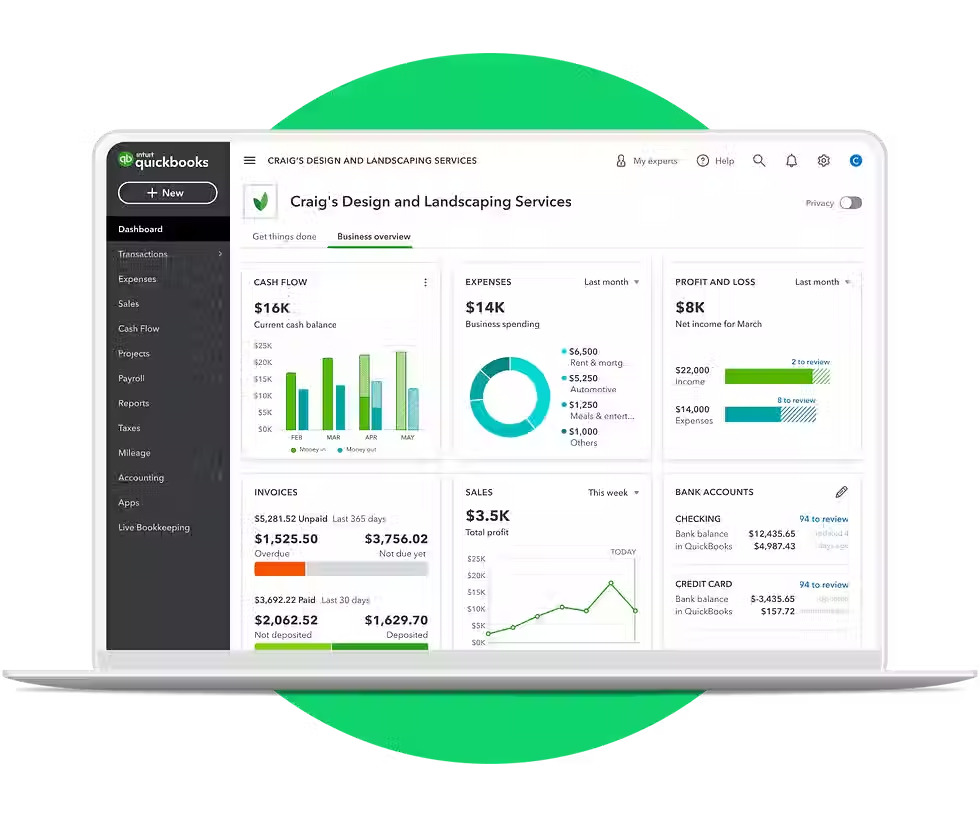
QuickBooks Essentials offers varied reporting tools that give businesses insights into their financial health. Users can generate detailed reports on income, expenses, and profit and loss. Business owners can easily see how their revenue has changed over the past year or assess monthly spending patterns, making it easier to adjust strategies accordingly.
The analytics feature helps users make informed decisions based on real-time data. In just a few clicks, businesses can create visual representations of their financial performance, which can lead to insights that improve bottom-line results by as much as 15%.
5. Multi-User Access
This software allows multiple users to access it simultaneously, making it ideal for teams. Business owners can assign various roles and permissions to team members, protecting sensitive information while promoting collaboration.
For instance, a team of five can work within the software without disruptions, improving workflow and efficiency. This collaborative approach is especially helpful for businesses that involve various departments, such as finance, sales, and operations.
Who is QuickBooks Essentials Right For?
Small to Medium-Sized Businesses
QuickBooks Essentials is primarily designed for small to medium-sized businesses needing a comprehensive accounting solution without the complexity of larger software systems. These businesses often work with tight budgets and look for user-friendly platforms that manage their financial tasks efficiently.
Service-Based Industries
Service-based industries like consulting, freelancing, and construction can benefit significantly from QuickBooks Essentials. The time tracking and invoicing features are crucial for businesses that charge clients based on billable hours. By improving these processes, service businesses free up time to focus on delivering quality services, leading to higher customer satisfaction and retention.
Entrepreneurs and Startups
Entrepreneurs and startups seeking to establish a strong financial base will find QuickBooks Essentials particularly useful. Its ease of use and affordability make it an attractive choice for those just beginning their journey. With features that support growth, the software can scale alongside their evolving business needs.
Nonprofit Organizations
Nonprofits face unique financial challenges, and QuickBooks Essentials helps manage their funds effectively. The software tracks donations, grants, and expenses, which is crucial for maintaining transparency and accountability. By utilizing QuickBooks, nonprofits can focus on their mission while keeping their finances organized.
Final Thoughts
QuickBooks Essentials is a versatile accounting software providing essential features to streamline financial management for different types of users. It includes invoicing, expense tracking, detailed reporting, and multi-user access, making it suitable for small and medium-sized businesses, service industries, entrepreneurs, and nonprofits.
By leveraging the capabilities of QuickBooks Essentials, users can simplify their financial processes, improve cash flow, and make smarter decisions based on up-to-date data. Whether you are a business owner or leading a nonprofit, QuickBooks Essentials can help you take control of your finances and concentrate on what really matters—growing your business.

PROGRAM | Simple Start | Essentials | |
PRICE: Retail | $38/mo Retail | $75/mo Retail | |
PRICE: Wholesale (with 30% ProAdvisor Discount) | $26.60/mo | $52.50/mo | |
Intuit Assist | |||
Smart expense organization New | ✅ | ✅ | |
Accounting Agent New | ➖ | ✅ | |
Payments Agent New | ➖ | ✅ | |
Customer Agent Beta | ➖ | ➖ | |
Finance Agent New | ➖ | ➖ | |
Project Management Agent Beta | ➖ | ➖ | |
Accounting | |||
Expert Assisted Try bookkeeping help FREE for 30 days* | ✅ | ✅ | |
Expert Tax File your business taxes with expert help | ✅ | ✅ | |
Automated bookkeeping | ✅ | ✅ | |
Tax deductions | ✅ | ✅ | |
Automated bank feeds | ✅ | ✅ | |
Accounting Agent New | ➖ | ✅ | |
AI-enabled expert collaboration New | ➖ | ✅ | |
Multiple currencies | ➖ | ✅ | |
AI-powered reconciliation Beta | ➖ | ➖ | |
Anomaly detection and resolution New | ➖ | ➖ | |
Revenue recognition | ➖ | ➖ | |
Auto-track fixed assets | ➖ | ➖ | |
Expenses & Pay Bills | |||
5 free ACH bank transfers/mo for bills New | ✅ | ✅ | |
Pay bills New | ✅ | ✅ | |
Auto-match transactions New | ✅ | ✅ | |
Auto-generated bills | ✅ | ✅ | |
Receipt capture | ✅ | ✅ | |
Bill management | ✅ | ✅ | |
Mileage tracking | ✅ | ✅ | |
Contractors | ✅ | ✅ | |
Sales & Get Paid | |||
Auto-generated invoices and reminders | ✅ | ✅ | |
Estimates | ✅ | ✅ | |
Invoice and payments | ✅ | ✅ | |
Connect sales channels | 1 | 3 | |
Sales and sales tax | Basic | Automated | |
Payments Agent New | ➖ | ✅ | |
Recurring invoices | ➖ | ✅ | |
Lending | |||
Business checking with 3.00% APY | ✅ | ✅ | |
Lending marketplace | ✅ | ✅ | |
Access capital | ✅ | ✅ | |
Customer Hub | |||
Customer management New | ✅ | ✅ | |
Notes and tasks management New | ✅ | ✅ | |
Reputation management New | ➖ | ✅ | |
Appointment scheduling Beta | ➖ | ✅ | |
Customer Agent Beta | ➖ | ➖ | |
Lead management New | ➖ | ➖ | |
Contract upload and e-signature New | ➖ | ➖ | |
Time | |||
Enter time | ➖ | ✅ | |
Project Management | |||
Project profitability | ➖ | ➖ | |
Job costing | ➖ | ➖ | |
Project Management Agent Beta | ➖ | ➖ | |
Inventory | |||
Inventory Tracking | ➖ | ➖ | |
Purchase orders | ➖ | ➖ | |
Sales orders | ➖ | ➖ | |
Shipping labels | ➖ | ➖ | |
Business Intelligence | |||
Cash flow planning | ➖ | ✅ | |
Budgeting | ➖ | ➖ | |
AI-powered profit & loss insights Beta | ➖ | ➖ | |
AI-powered balance sheet insights Beta | ➖ | ➖ | |
Finance Agent New | ➖ | ➖ | |
Forecasting | ➖ | ➖ | |
Custom report builder | ➖ | ➖ | |
Data sync with Excel | ➖ | ➖ | |
KPI scorecard Beta | ➖ | ➖ | |
Connected Platform | |||
Users | 1 | 3 | |
Automatic business feed New | ✅ | ✅ | |
Mobile app | ✅ | ✅ | |
Integrate with hundreds of apps | ✅ | ✅ | |
Reports | Basic | Enhanced | |
User management and permissions | ➖ | Basic | |
Custom Fields | ➖ | 4 | |
Class and location tracking | ➖ | ➖ | |
Workflow automation | ➖ | ➖ | |
Batch invoices and expenses | ➖ | ➖ | |
Backup and restore | ➖ | ➖ | |
Support and training | ➖ | ➖ |


Comments